How to set-up PayPal using the API (Business)
We offer direct PayPal integration into our platform, we have two types of integration; PayPal Legacy (for personal accounts) (click here for the article). And this one, using the PayPal API. This integration allows us to have more control and offer more features (like Subscriptions). A PayPal business account is required, it will not work on personal accounts.
Getting your credentials & setting it up#
First, we need to create a "PayPal App client ID", and "PayPal App Secret". To do this, follow the steps;
1. Go to the developers section of PayPal:
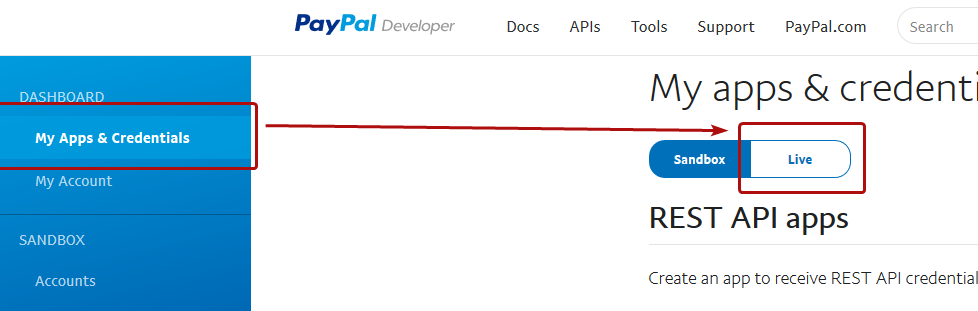
2. Click "My Apps & Credentials" and click "Live".
3. Click "Create App" and name your app, we recommend you name it something like "CraftingStore" so you can find it later.
4. Scroll down and make sure that at least the following options are enabled at "Live App Settings": "Accept payments" & "Customer Disputes"
5. Here you will find your Client ID and Secret (by clicking show). Now go to the CraftingStore dashboard [ Sidebar -> Payments -> Gateways ] and click "Set-up PayPal".
6. Select "PayPal API (Business)" and enter the credentials you created in the step before. Also make sure to select "Business" as the integration type.
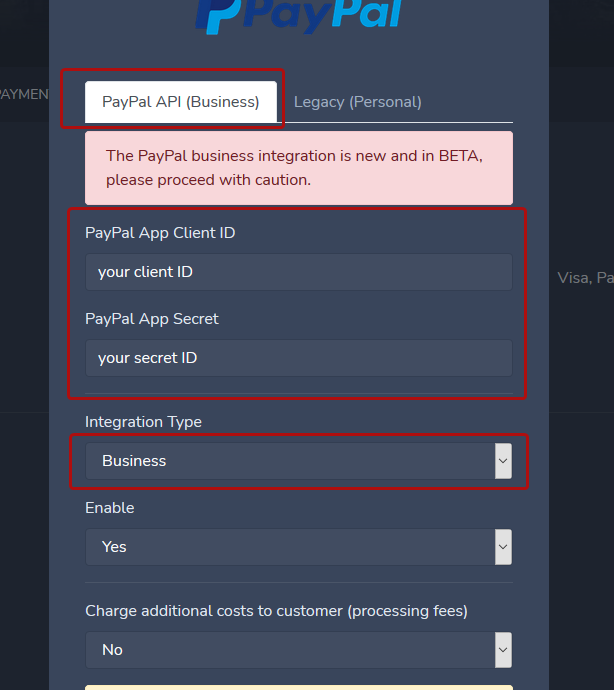
7. Click "done" and click "Update gateways"
PayPal is now enabled, when the first transaction comes in, we will create a webhook within this app to notify us about payment/subscription updates.
Common issues#
I'm getting an error on checkout#
Make sure that the credentials entered are valid. Also make sure that they are actually "Live" credentials. We are sending requests to the live version of PayPal to create your payment (so the user has to pay using their real account). Credentials meant for their testing version will not work.
What is the difference between Legacy and Business?#
The Legacy integration uses PayPal payment buttons. It works on almost any account, including personal accounts. The Business integration uses the PayPal orders API that offers a lot of control and implements features like subscriptions.